
Amazon Alexa
Amazon Mobile LLCLifestyle
4.1151.45K Reviews
- Version
- 2.2.730155.0
- Installs
- 100.00M
- Age Rating
- Teen
Screenshots



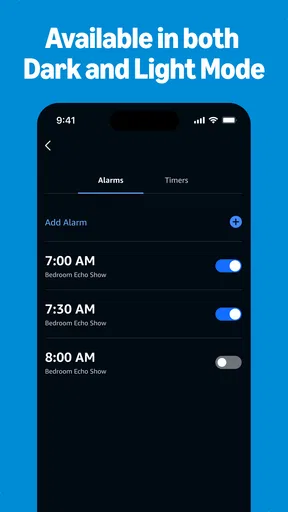
Our Review of Amazon Alexa
 Analysis by Appyee
I judge Amazon Alexa less by whether it can answer a novelty question and more by whether it makes routine tasks easier to remember and carry out. In my experience, it works best as a companion to compatible smart-home devices and Amazon’s voice-assistant ecosystem, rather than as a standalone app that will transform every phone habit. The useful part is the handoff between quick voice requests and practical controls; the catch is that its value depends on what you already use at home.
Who gets the most from it
This is a lifestyle app from Amazon Mobile LLC, and its appeal is easiest to see in a home where people already use Alexa-compatible devices or want one place to manage them. If you regularly set timers, check reminders, keep a shopping list, or control connected lights, having those tasks close together can save small amounts of effort throughout the day. Those little wins matter most when your hands are occupied or you are moving between rooms.
For example, while preparing dinner, I might ask for a timer, then add an ingredient to the shopping list before I forget it. Later, I can use a voice request to switch on a light rather than stopping to find a wall switch or open a separate device app. The convenience comes from chaining several ordinary tasks together, not from any one request being remarkable. If those are tasks you already handle by voice, this app gives them a home on your phone as well.
What to expect before relying on it
There is a practical distinction between using Alexa through the phone and using it with an Alexa-enabled device in the room. A phone app gives you a way to manage settings and interact with the assistant, but it does not make every room hands-free by itself. If you want voice control while your phone is elsewhere, the experience depends on having a suitable device within reach. I would decide which kind of convenience I actually want before building a routine around it.
It is also worth thinking about how the people in your household will use it. Voice recognition can help personalize the experience, but spoken commands are not always the easiest option in a noisy room, around guests, or for someone who would rather tap through a screen. I would keep a manual route available for important controls and reminders. That is less about Alexa failing and more about making sure a voice assistant is not the only way to do something you need to do reliably.
Getting Started with Alexa
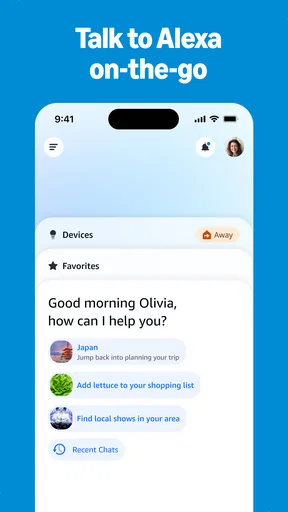
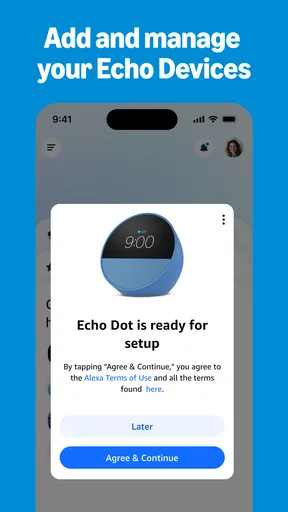
First off, downloading and setting up Amazon Alexa is a breeze. Available on both Android and iOS, all you need is an Amazon account, and you're ready to roll. Once installed, you’ll be greeted with a sleek interface that’s both intuitive and user-friendly. I found it super easy to navigate through various options and settings.
Features That Stand Out
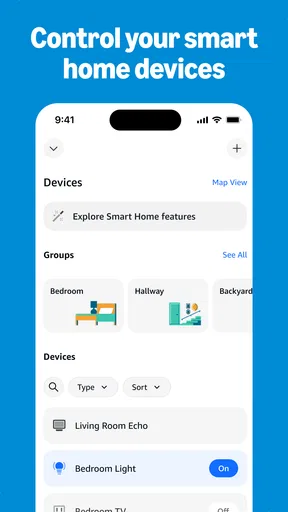
One of the coolest features of Alexa is its ability to control smart home devices. Whether you’ve got smart lights, thermostats, or even smart locks, Alexa can handle them all with simple voice commands. Just saying “Alexa, turn on the lights” felt like I was living in the future. And let’s not forget about the app’s music streaming capabilities. With access to Amazon Music, Spotify, and other platforms, you can play your favorite tunes just by asking.
Alexa’s skills are another highlight. Think of them as mini-apps that enhance Alexa’s capabilities. From ordering pizza to playing trivia games, there’s a skill for almost everything. Setting up skills is straightforward, and they add a lot of fun and functionality to the app.
Making routines dependable
A helpful way to get more from an assistant is to choose a few repeated tasks and make them easy to trigger, instead of trying to automate your entire day at once. I would start with a reliable timer, a shopping list, and one smart-home action I already do regularly. If those work well in the rooms where I need them, then it makes sense to explore more skills or connected devices. This gradual approach also makes it easier to notice which requests are genuinely useful and which are just entertaining once.
Before relying on any voice command, I would test the exact wording and the device response when there is no rush. A command that feels obvious to me may not be the phrase I naturally remember later, especially when I am cooking or carrying something. Keeping commands simple and using the same phrasing helps make the interaction feel predictable. For anything time-sensitive, I would check that the reminder or timer was actually set rather than assuming the assistant heard me correctly.
Where the convenience has limits
Alexa is not a universal remote for every product in a home. The usefulness of smart-home control depends on whether the devices work with the assistant and are set up correctly. If your household has a mix of products that each rely on separate systems, Alexa may simplify some controls without removing the need for those other apps. I would check compatibility before buying new hardware with the expectation that the app will manage it.
Music is another area where the experience depends on your existing setup and preferences. Voice requests are convenient when you know what you want to hear, but browsing, comparing albums, or managing a queue can be easier in a dedicated music app. I see Alexa as a useful shortcut for playback, not a replacement for every feature of a streaming service. If listening is your main reason for installing it, compare how you actually choose and organize music before making it your default.
Alexa in Daily Life
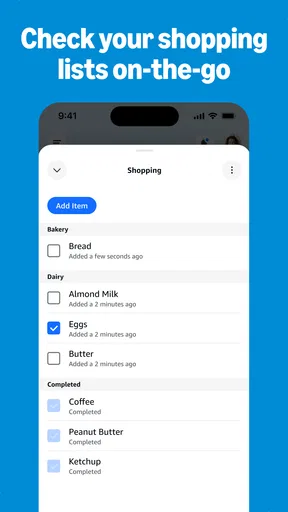
Integrating Alexa into my daily routine was seamless. Need a quick weather update before you head out? Ask Alexa. Want to add items to your shopping list while cooking? Just tell Alexa. It’s like having a personal assistant who never gets tired. The reminders and timers feature is incredibly handy for keeping track of my busy schedule. Plus, the drop-in feature is perfect for checking in with family members in different rooms.
Another thing I appreciated was Alexa’s ability to recognize different voices. This means personalized experiences for each family member, which is pretty neat. And if you’re worried about privacy, Amazon has included options to manage your voice recordings, ensuring you have control over your data.
How it compares with other ways to get things done
Compared with using a phone’s built-in assistant, Alexa makes the most sense when your routines already involve Amazon’s assistant or compatible home devices. A built-in assistant may feel more natural for phone-specific actions, while Alexa can be a better fit for someone who wants voice requests to connect with household controls. Neither choice is automatically better: I would use the assistant that can reliably reach the devices and services I depend on, rather than switching just because one has a longer list of skills.
Compared with opening a separate app for every light, speaker, or reminder, a shared assistant can reduce app-hopping once the devices are configured. The trade-off is that setup and compatibility become part of the experience. If you only own one connected device, its manufacturer’s app may be more direct; if you have several compatible devices and repeat the same actions, Alexa’s central role becomes more worthwhile. For basic timers and notes alone, a phone’s built-in tools may be enough.
What the numbers say about its reach
Alexa is free, has a Teen content rating, and has been available since November 17, 2014. Its scale is considerable: it has over 100 million installs and an average rating of 4.1 from around 5.3 million ratings, alongside roughly 145,000 written reviews. Those figures suggest that it is a well-established option, but popularity does not guarantee a fit for every household. I would treat them as context, then make the decision based on compatibility, preferred voice controls, and whether I have repeated tasks the app can genuinely simplify.
The current version is 2.2.656185.0, with Android 10 as the minimum operating system. If you are deciding whether to install it, the key practical question is not how many skills are available; it is whether you will use voice control often enough to justify another assistant in your routine. If you are comfortable with an Amazon account and want to manage compatible devices, lists, or reminders, the free app is an easy one to try. If you mainly need a basic alarm, notes, or phone settings, your device’s built-in tools may be simpler.
Final Thoughts
All in all, Amazon Alexa has truly impressed me. It’s not just an app; it’s a companion that makes everyday tasks more manageable and fun. Whether you’re a tech enthusiast or someone just looking to simplify their life, Alexa is worth checking out. With its vast array of features and constant updates, it’s clear that Alexa isn’t going anywhere anytime soon. So, go ahead, give it a try and see how it transforms your day-to-day activities!
Privacy and Permissions
See what permissions an app requests and how it handles your data.
- Identity
- find accounts on the device, add or remove accounts
- Contacts
- find accounts on the device, read your contacts, modify your contacts
- Location
- approximate location (network-based), precise location (GPS and network-based)
- SMS
- read your text messages (SMS or MMS), receive text messages (MMS), receive text messages (SMS), send SMS messages
- Phone
- directly call phone numbers, read phone status and identity
- Photos/Media/Files
- read the contents of your USB storage, modify or delete the contents of your USB storage
- Storage
- read the contents of your USB storage, modify or delete the contents of your USB storage
- Camera
- take pictures and videos
- Microphone
- record audio
- Wi-Fi connection information
- view Wi-Fi connections
- Device ID & call information
- read phone status and identity
- Other
- view network connections, create accounts and set passwords, pair with Bluetooth devices, access Bluetooth settings, change network connectivity, allow Wi-Fi Multicast reception, connect and disconnect from Wi-Fi, full network access, change your audio settings, run at startup, use accounts on the device, control vibration, prevent device from sleeping
How Amazon Alexa Compares
Full ComparisonChoose Google Home for Nest and Chromecast control, SmartThings for Samsung households and broad device support, or Alexa for voice control and a large skills library.
| App | Developer | Rating | Price |
|---|---|---|---|
 Google Home | Google LLC | 4.0 | Free |
 SmartThings | Samsung Electronics Co., Ltd. | 4.6 | Free |
 Amazon AlexaThis App | Amazon Mobile LLC | 4.1 | Free |
Verdict
Strengths of Amazon Alexa
- Seamless smart home integration.
- Voice recognition is highly accurate.
- Extensive skill library available.
- Frequent updates enhance functionality.
- Compatible with various devices.
Limitations of Amazon Alexa
- Requires constant internet connection.
- Privacy concerns with voice data.
- Occasional app crashes reported.
- Limited offline functionality.
- Can be complex for beginners.
Other Releases by Amazon Mobile LLC
View All
MX Player
Video Players & Editors4.2

Amazon Shopping
Shopping4.4

Prime Video
Entertainment4.7

Prime Video
Entertainment3.1
Similar Picks in This Category
View All
SmartThings
Samsung Electronics Co., Ltd.4.6

Google Home
Google LLC4.0

Pinterest4.2

Astrotalk - Talk to Astrologer
Astrology & Horoscope4.7

My Verizon
Verizon Consumer Group4.5

Samsung Wallet (Samsung Pay)
Samsung Electronics Co., Ltd.4.1
You May Also Like
View All
Frequently Asked Questions
What is Amazon Alexa and how does it work?
Amazon Alexa is a cloud-based voice assistant that powers a range of smart devices, allowing you to control smart home gadgets, play music, get weather updates, and more using voice commands. It works by processing your voice input and providing responses or executing tasks through its connection to the internet and compatible devices.
Is Amazon Alexa compatible with all smart home devices?
While Alexa supports a wide variety of smart home devices, compatibility is not universal. Most major brands like Philips Hue, Nest, and Samsung SmartThings are supported. However, it’s important to check if Alexa supports your specific devices by looking for the ‘Works with Alexa’ label before purchasing or integrating any new smart home gadget.
Does Amazon Alexa store my voice recordings?
Yes, Alexa does store your voice recordings to improve its service. You can review and delete these recordings in the Alexa app under Settings > Alexa Privacy. Amazon allows you to manage how your data is used and provides options to delete your voice history for privacy concerns.
Can I use Alexa without an Amazon Prime subscription?
Yes, you can use Alexa without an Amazon Prime subscription. However, certain features like Amazon Music Unlimited or exclusive deals might require a Prime membership. Alexa provides a wide range of functionalities that do not require any subscription, including smart home control, basic music streaming, and general inquiries.
How secure is Amazon Alexa from unauthorized access?
Amazon Alexa incorporates several security measures, including voice recognition and the ability to set up voice profiles. However, like any online service, it’s important to use strong passwords and keep your devices updated. Regularly reviewing your Alexa privacy settings can also help you manage data security and access permissions effectively.
